DESIGN SYSTEMS DESIGNER
Scaling accessible reordering across a clinical design system
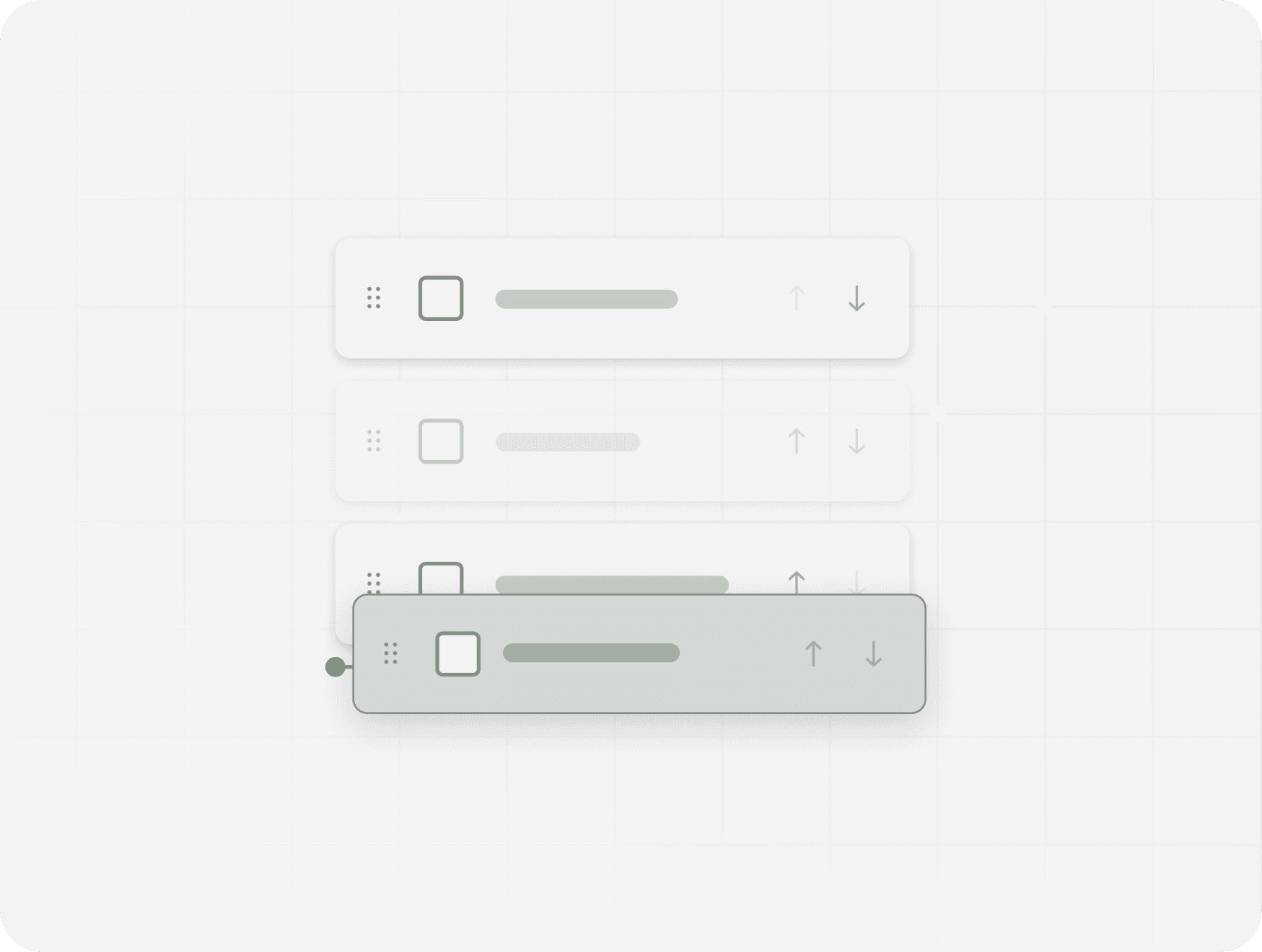
Drag-and-drop interactions across Optum’s Clinical Platform were visually inconsistent, inaccessible by keyboard, and risky in high-stakes workflows. I led the redesign of the pattern into a scalable, WCAG-compliant system that supports keyboard users, screen readers, and non-gesture alternatives—adopted across clinician and patient-facing products.

DESIGN SYSTEMS DESIGNER
Scaling accessible reordering across a clinical design system
Drag-and-drop interactions across Optum’s Clinical Platform were visually inconsistent, inaccessible by keyboard, and risky in high-stakes workflows. I led the redesign of the pattern into a scalable, WCAG-compliant system that supports keyboard users, screen readers, and non-gesture alternatives—adopted across clinician and patient-facing products.

DESIGN SYSTEMS DESIGNER
Scaling accessible reordering across a clinical design system
Drag-and-drop interactions across Optum’s Clinical Platform were visually inconsistent, inaccessible by keyboard, and risky in high-stakes workflows. I led the redesign of the pattern into a scalable, WCAG-compliant system that supports keyboard users, screen readers, and non-gesture alternatives—adopted across clinician and patient-facing products.
THE PROBLEM
Context
Across multiple products, drag-and-drop was used for reordering care plans, tasks, and patient data. The interaction relied on pointer gestures, lacked keyboard support, and provided unclear confirmation of changes. In clinical workflows, incorrect ordering risks compromising quality of care and patient safety.
“If the order is wrong, that’s not a small mistake. I need to be confident before I save.”

CHARGE NURSE, INPATIENT UNIT
THE PROBLEM
Context
Across multiple products, drag-and-drop was used for reordering care plans, tasks, and patient data. The interaction relied on pointer gestures, lacked keyboard support, and provided unclear confirmation of changes. In clinical workflows, incorrect ordering risks compromising quality of care and patient safety.
“If the order is wrong, that’s not a small mistake. I need to be confident before I save.”
CHARGE NURSE, INPATIENT UNIT
THE PROBLEM
Context
Across multiple products, drag-and-drop was used for reordering care plans, tasks, and patient data. The interaction relied on pointer gestures, lacked keyboard support, and provided unclear confirmation of changes. In clinical workflows, incorrect ordering risks compromising quality of care and patient safety.
“If the order is wrong, that’s not a small mistake. I need to be confident before I save.”
CHARGE NURSE, INPATIENT UNIT
THE RESEARCH
Methods
I reviewed drag-and-drop patterns across clinical and consumer products to understand common interaction models, affordances, and limitations. In parallel, I conducted an accessibility audit against WCAG guidelines to identify gaps in keyboard support, feedback, and gesture reliance within the existing system.
Insights
Most drag-and-drop patterns prioritized mouse and visual precision, with limited keyboard support and inconsistent feedback. Gesture-only interactions broke down for longer lists and higher-risk tasks, highlighting the need for clearer affordances and non-gesture alternatives.
3. Evidence
Mouse-only interaction
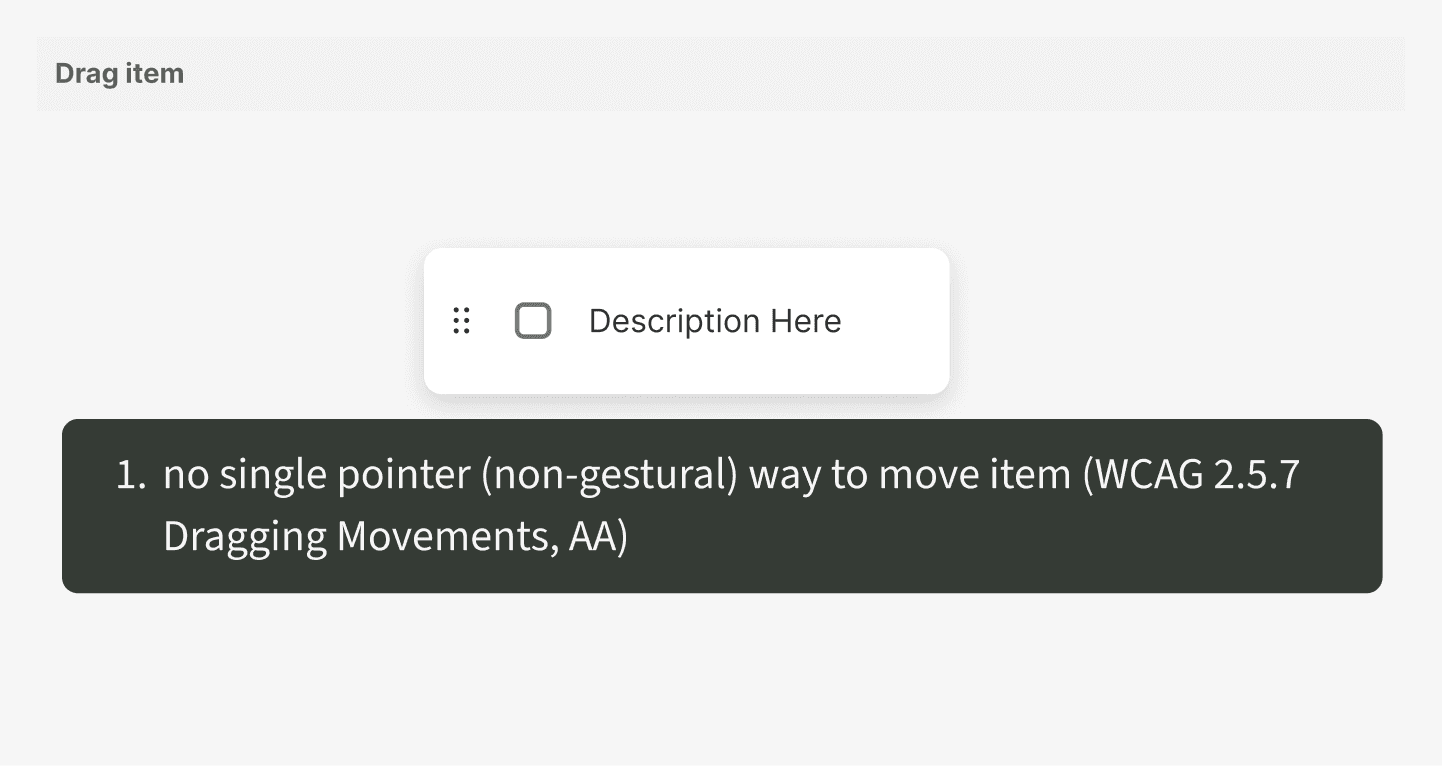
The drag-and-drop interaction relies on pointer gestures only, with no non-gestural alternative. This prevents users who rely on keyboards or assistive technologies from reordering items (WCAG 2.5.7, AA).
Finding 1 of 4


THE RESEARCH
Methods
I reviewed drag-and-drop patterns across clinical and consumer products to understand common interaction models, affordances, and limitations. In parallel, I conducted an accessibility audit against WCAG guidelines to identify gaps in keyboard support, feedback, and gesture reliance within the existing system.
Insights
Most drag-and-drop patterns prioritized mouse and visual precision, with limited keyboard support and inconsistent feedback. Gesture-only interactions broke down for longer lists and higher-risk tasks, highlighting the need for clearer affordances and non-gesture alternatives.
3. Evidence
A. Mouse-Only Interaction
The drag-and-drop interaction relies on pointer gestures only, with no non-gestural alternative. This prevents users who rely on keyboards or assistive technologies from reordering items (WCAG 2.5.7, AA).
Finding 1 of 4
THE RESEARCH
Methods
I reviewed drag-and-drop patterns across clinical and consumer products to understand common interaction models, affordances, and limitations. In parallel, I conducted an accessibility audit against WCAG guidelines to identify gaps in keyboard support, feedback, and gesture reliance within the existing system.
Insights
Most drag-and-drop patterns prioritized mouse and visual precision, with limited keyboard support and inconsistent feedback. Gesture-only interactions broke down for longer lists and higher-risk tasks, highlighting the need for clearer affordances and non-gesture alternatives.
A. Mouse-Only Interaction
The drag-and-drop interaction relies on pointer gestures only, with no non-gestural alternative. This prevents users who rely on keyboards or assistive technologies from reordering items (WCAG 2.5.7, AA).
Finding 1 of 4
3. Evidence
B. Insufficient Tap Target
The drag handle’s tap target is too small to reliably interact with, increasing error risk for users with motor impairments or limited precision (WCAG 2.5.5, AA).
Finding 2 of 4

C. Missing Semantic Information
The draggable control lacks an accessible name and role and is not keyboard navigable, making it undiscoverable and unusable for screen reader and keyboard users (WCAG 4.1.2, 2.1.1).
Finding 3 of 4

D. Unclear Drop Zone Feedback
Low-contrast drop zone styling and persistent instructional text reduce discoverability and add confusion, making it difficult to understand where items can be dropped (WCAG 1.4.11, AA).
Finding 4 of 4

DESIGN IDEATION
Design ideation and constraints
I explored multiple interaction patterns for reordering items to balance accessibility, efficiency, and scalability across short and long lists.
CONSTRAINTS
Must support keyboard, screen reader, and non-gestural users. Must scale from 3-item lists to 50+ item lists. Must minimize visual noise and cognitive load within dense clinical UIs.
Step 1 of 3


DESIGN IDEATION
Design ideation and constraints
I explored multiple interaction patterns for reordering items to balance accessibility, efficiency, and scalability across short and long lists.
CONSTRAINTS
Must support keyboard, screen reader, and non-gestural users. Must scale from 3-item lists to 50+ item lists. Must minimize visual noise and cognitive load within dense clinical UIs.
Step 1 of 3
DESIGN IDEATION
Design ideation and constraints
I explored multiple interaction patterns for reordering items to balance accessibility, efficiency, and scalability across short and long lists.
CONSTRAINTS
Must support keyboard, screen reader, and non-gestural users. Must scale from 3-item lists to 50+ item lists. Must minimize visual noise and cognitive load within dense clinical UIs.
Step 1 of 3
Ideation summary
Interaction patterns explored: (1) Direct manipulation (drag + arrows), (2) Menu-based reordering, (3) Select / input-based positioning, and (4) Popover-based controls for long lists.
Step 2 of 3
Learnings
Direct manipulation is effective for short, low-risk lists, but loses efficiency as list length increases. Menu-based reordering improves keyboard access and reduces visual clutter, but introduces unnecessary steps for simple changes. For long lists and complex sequencing tasks, users favored structured, popover-based controls that provide greater precision and confidence.
Step 3 of 3
List Length Drives Interaction Choice
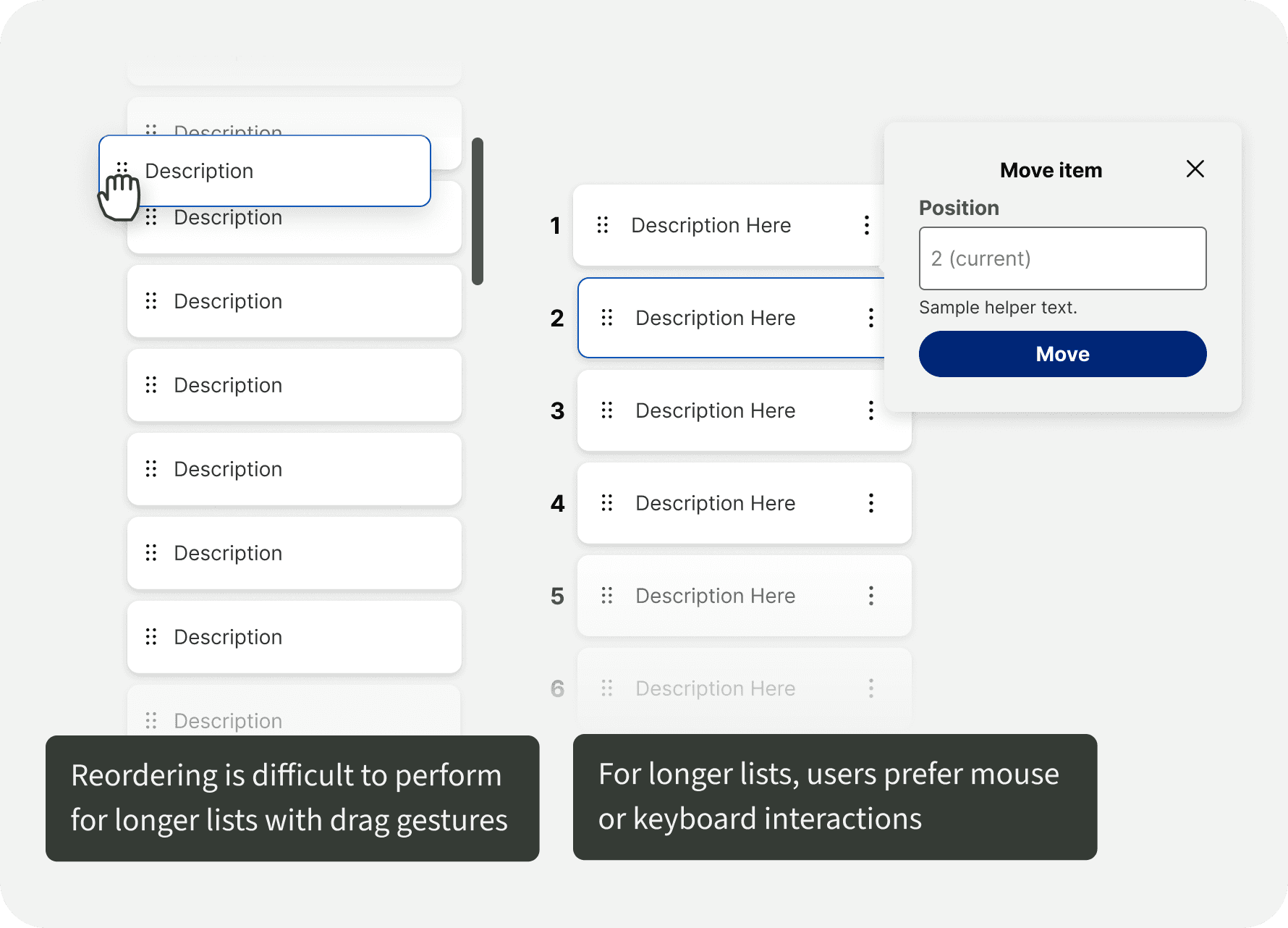
Users preferred drag-and-drop for short, local reordering, but confidence dropped as lists grew longer or changes became more complex. For larger reordering tasks, users favored precise, step-based controls over dragging.
Finding 1 of 3
List Length Drives Interaction Choice
Users preferred drag-and-drop for short, local reordering, but confidence dropped as lists grew longer or changes became more complex. For larger reordering tasks, users favored precise, step-based controls over dragging.
Finding 1 of 3
List Length Drives Interaction Choice
Users preferred drag-and-drop for short, local reordering, but confidence dropped as lists grew longer or changes became more complex. For larger reordering tasks, users favored precise, step-based controls over dragging.
Finding 1 of 3
Missing Feedback Increases Risk
When reordering actions lacked clear confirmation, users second-guessed whether changes were successful. In clinical contexts, this uncertainty increased perceived risk and reduced trust in the interaction.
Finding 2 of 3

Gesture-Only Reordering Limits Access
Drag-only interactions prevented keyboard and assistive technology users from completing tasks, leading some users to avoid reordering altogether—even when it would improve their workflow.
Finding 3 of 3

THE SOLUTION
SHORT LISTS
Pattern 1 of 3
1.
Direct Drag-and-Drop
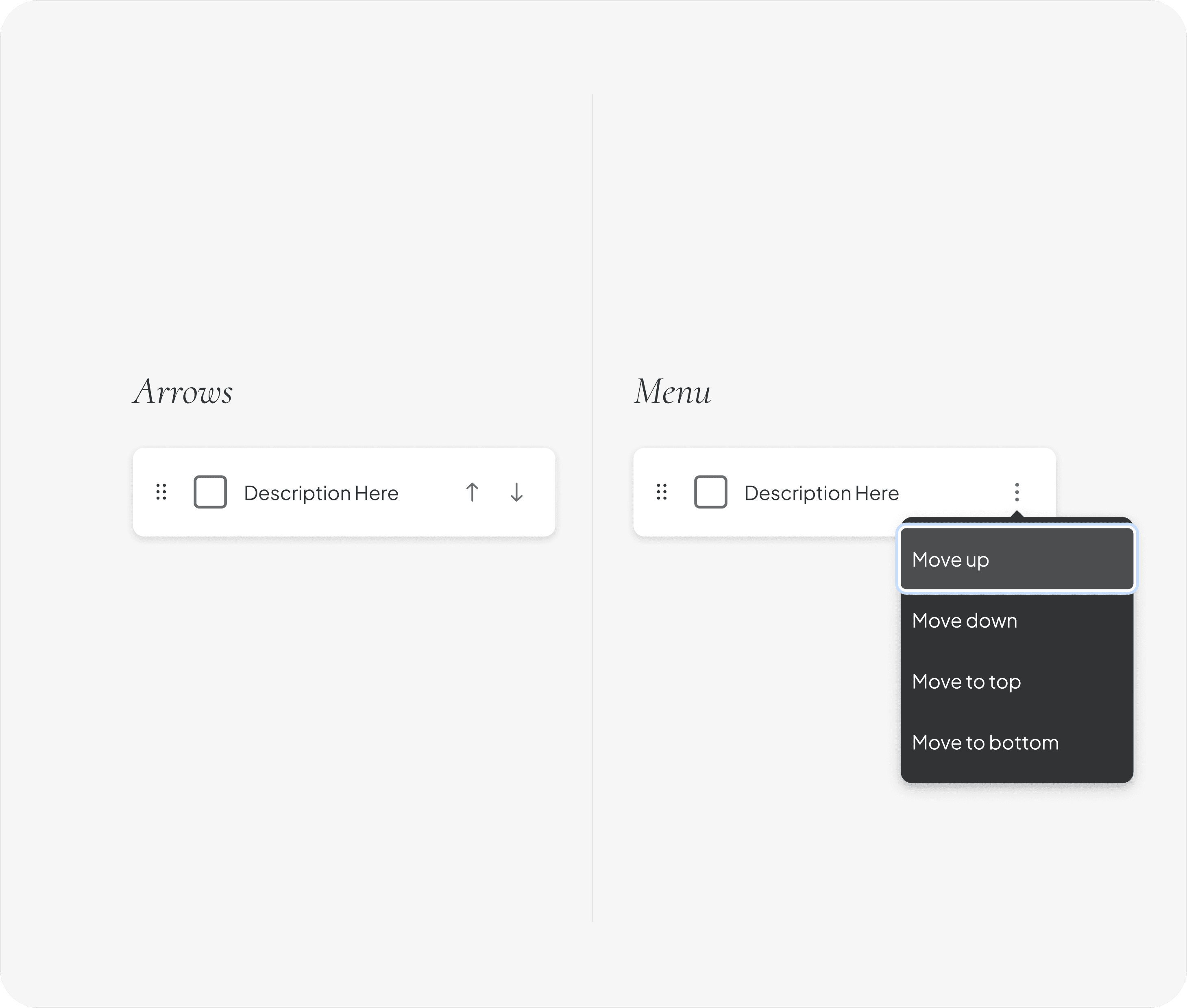
For short lists, items can be reordered directly using a visible drag handle. Immediate visual feedback confirms the new position as the item is moved.
DESIGN JUSTIFICATION
Dragging is fast and intuitive for small, low-risk changes, minimizing interaction cost while remaining accessible through clear affordances and keyboard support.
SHORT LISTS
Pattern 1 of 3
Direct Drag-and-Drop
For short lists, items can be reordered directly using a visible drag handle. Immediate visual feedback confirms the new position as the item is moved.
DESIGN JUSTIFICATION
Dragging is fast and intuitive for small, low-risk changes, minimizing interaction cost while remaining accessible through clear affordances and keyboard support.
MEDIUM LISTS
Pattern 2 of 3
2.
Drag with Step-Based Controls
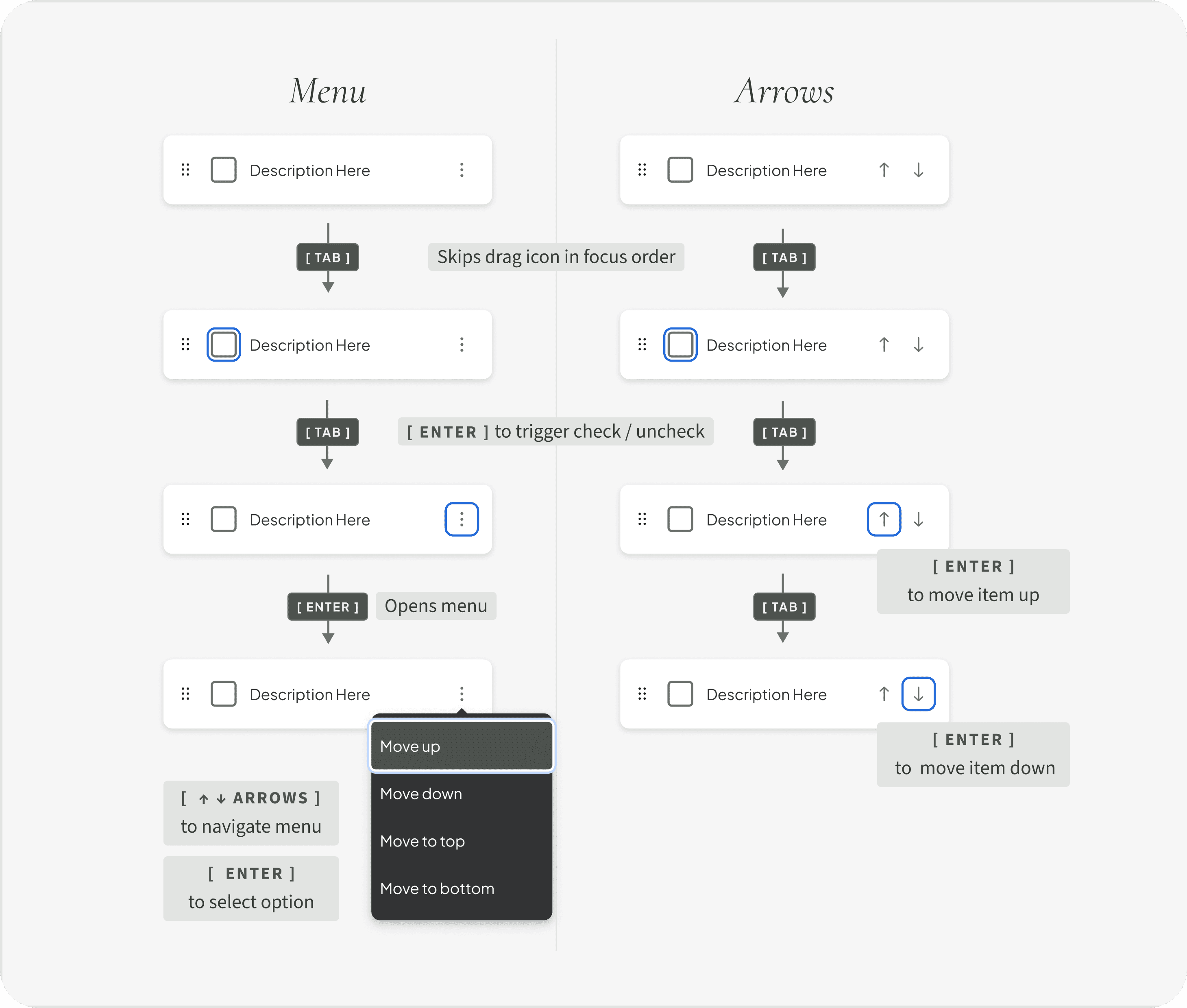
For medium-length lists, drag-and-drop is paired with move controls (e.g., move up/down actions) that allow users to adjust position incrementally without relying on dragging.
DESIGN JUSTIFICATION
This supports speed and precision, giving users flexibility to reorder confidently as complexity increases—especially when dragging becomes less efficient.
MEDIUM LISTS
Pattern 2 of 3
Drag with Step-Based Controls
For medium-length lists, drag-and-drop is paired with move controls (e.g., move up/down actions) that allow users to adjust position incrementally without relying on dragging.
DESIGN JUSTIFICATION
This supports speed and precision, giving users flexibility to reorder confidently as complexity increases—especially when dragging becomes less efficient.
LONG LISTS
Pattern 3 of 3
3.
Menu-Based Reordering
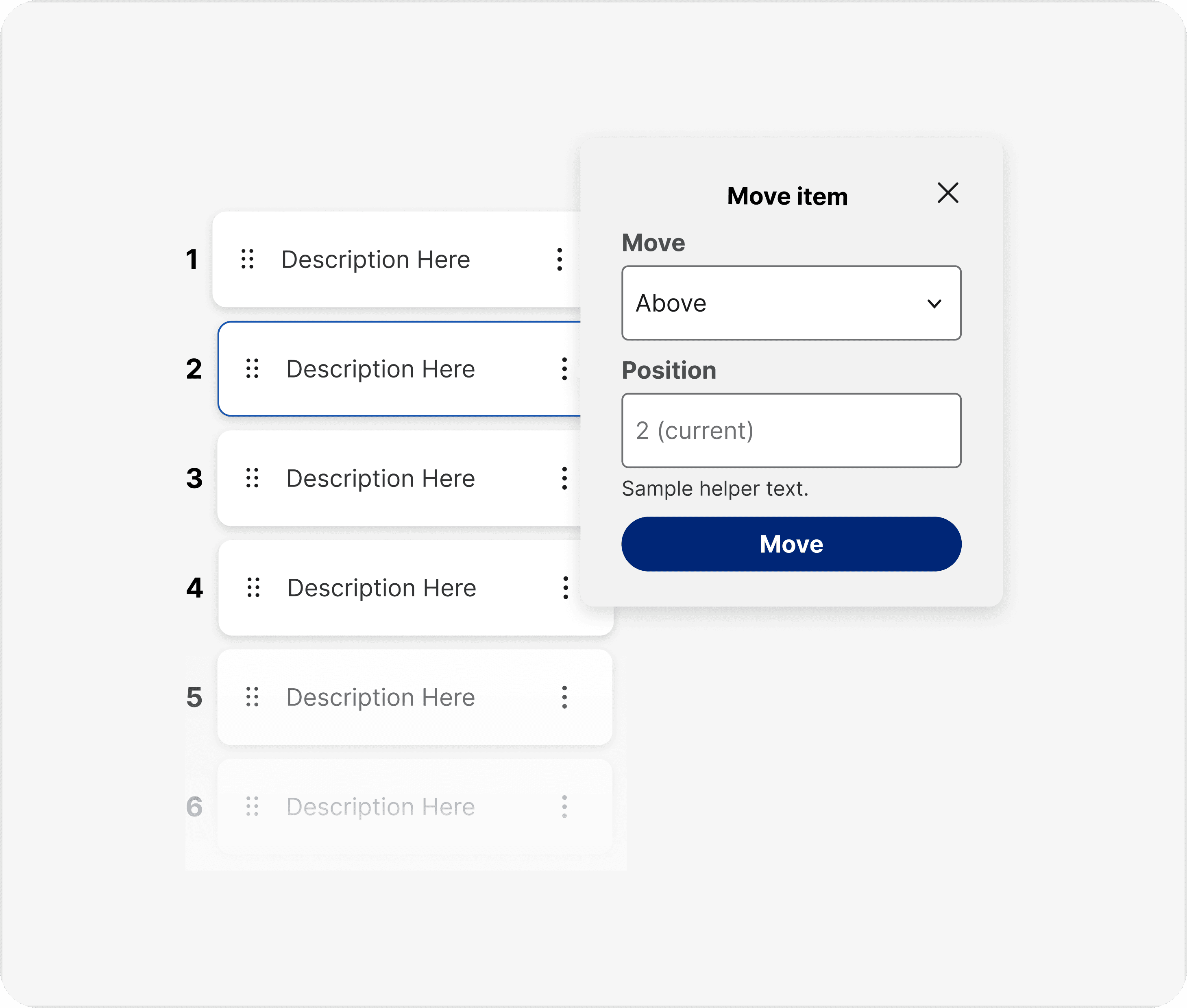
For long lists, reordering is handled through menu-driven actions that let users select a destination position or move items in defined steps, without requiring drag gestures.
DESIGN JUSTIFICATION
Menu-based controls reduce cognitive load and error risk in complex scenarios, providing precise, accessible reordering.
LONG LISTS
Pattern 3 of 3
Menu-Based Reordering
For long lists, reordering is handled through menu-driven actions that let users select a destination position or move items in defined steps, without requiring drag gestures.
DESIGN JUSTIFICATION
Menu-based controls reduce cognitive load and error risk in complex scenarios, providing precise, accessible reordering.
THE FINAL REFLECTIONS
Takeaways
This project reinforced that interaction patterns must adapt to workflow complexity—especially in clinical environments where incorrect interactions impact quality of care and patient outcomes.
By redefining drag-and-drop as a flexible interaction model, we established a scalable standard for accessible, reliable reordering across products and input methods.
“Now I know exactly what changed before I save. I don’t have to second-guess the order anymore.”
CHARGE NURSE | INPATIENT UNIT
Next steps
After approval from design system and governance teams, I documented the recommended patterns in Figma and supported adoption across products, ensuring accessibility, consistency, and scalability.
THE FINAL REFLECTIONS
Takeaways
This project reinforced that interaction patterns must adapt to workflow complexity—especially in clinical environments where incorrect interactions impact quality of care and patient outcomes.
By redefining drag-and-drop as a flexible interaction model, we established a scalable standard for accessible, reliable reordering across products and input methods.
“Now I know exactly what changed before I save. I don’t have to second-guess the order anymore.”
CHARGE NURSE | INPATIENT UNIT
Next steps
After approval from design system and governance teams, I documented the recommended patterns in Figma and supported adoption across products, ensuring accessibility, consistency, and scalability.


