LEAD DESIGNER
Turning a stalled AI design system rollout into an 80% product team adoption
Led the design of Netra AI, an AI-supported clinical design system, reducing migration from ~4200 hours to under two weeks and enabling teams to deliver products up to 5x faster—driving adoption from 0 to 80%.


LEAD DESIGNER
Turning a stalled AI design system rollout into an 80% product team adoption
Led the design of Netra AI, an AI-supported clinical design system, reducing migration from ~4200 hours to under two weeks and enabling teams to deliver products up to 5x faster—driving adoption from 0 to 80%.
LEAD DESIGNER
Turning a stalled AI design system rollout into an 80% product team adoption
Led the design of Netra AI, an AI-supported clinical design system, reducing migration from ~4200 hours to under two weeks and enabling teams to deliver products up to 5x faster—driving adoption from 0 to 80%.
THE PROBLEM
Context
Optum was rolling out Netra AI, an AI-assisted design system built on ShadCN and Radix. The goal was to move teams to a React-based component library aligned with company-wide AI initiatives.
However, migration required converting hundreds of existing designs to the new system. Netra supported dozens of clinical products and hundreds of designers across the Optum Clinical platform. The AI conversion tool produced inconsistent results, accessibility gaps remained unresolved, and designers were uncertain about how the new workflow would affect their role.
After four months, no product teams had converted.
“Manually converting hundreds of pages takes months. The AI tool isn’t accurate enough to trust—and designers aren’t sure it’s meant to help us or replace us.”

PRODUCT DESIGNER | ALYSSA
THE PROBLEM
Context
Optum was rolling out Netra AI, an AI-assisted design system built on ShadCN and Radix. The goal was to move teams to a React-based component library aligned with company-wide AI initiatives.
However, migration required converting hundreds of existing designs to the new system. Netra supported dozens of clinical products and hundreds of designers across the Optum Clinical platform. The AI conversion tool produced inconsistent results, accessibility gaps remained unresolved, and designers were uncertain about how the new workflow would affect their role.
After four months, no product teams had converted.
“Manually converting hundreds of pages takes months. The AI tool isn’t accurate enough to trust—and designers aren’t sure it’s meant to help us or replace us.”
PRODUCT DESIGNER | ALYSSA
THE PROBLEM
Context
Optum was rolling out Netra AI, an AI-assisted design system built on ShadCN and Radix. The goal was to move teams to a React-based component library aligned with company-wide AI initiatives.
However, migration required converting hundreds of existing designs to the new system. Netra supported dozens of clinical products and hundreds of designers across the Optum Clinical platform. The AI conversion tool produced inconsistent results, accessibility gaps remained unresolved, and designers were uncertain about how the new workflow would affect their role.
After four months, no product teams had converted.
“Manually converting hundreds of pages takes months. The AI tool isn’t accurate enough to trust—and designers aren’t sure it’s meant to help us or replace us.”
PRODUCT DESIGNER | ALYSSA


THE RESEARCH
Methods
Methods
Through interviews with five designers, a survey with 75 respondents, and three observed testing sessions, our team aimed to uncover the primary blockers and pain points in why they did not convert to Netra AI.
Through interviews with five designers, a survey with 75 respondents, and three observed testing sessions, our team aimed to uncover the primary blockers and pain points in why they did not convert to Netra AI.
Insights
Insights
We uncovered three primary blockers:
Personal resistance to AI tooling and job displacement fears
Poor accessibility and clinical usability in base components
High design effort for migration without 1:1 component mapping
We uncovered three primary blockers:
Personal resistance to AI tooling and job displacement fears
Poor accessibility and clinical usability in base components
High design effort for migration without 1:1 component mapping
THE APPROACH
Ensuring quality
To address low-quality outputs and WCAG gaps, I conducted a full accessibility audit of base components, documented findings in Figma, and contributed issues to the ShadCN repo. I also established a token and theming system aligned with ShadCN and Vercel to ensure AI-generated outputs matched Netra design standards.
Finding 1 of 3


THE APPROACH
Ensuring quality
To address low-quality outputs and WCAG gaps, I conducted a full accessibility audit of base components, documented findings in Figma, and contributed issues to the ShadCN repo. I also established a token and theming system aligned with ShadCN and Vercel to ensure AI-generated outputs matched Netra design standards.
Finding 1 of 3
Reducing conversion effort
To reduce conversion effort: Created a Netra-to-Netra AI comparison doc to clarify gaps and offer 1:1 alternatives for quick component swapping 1:1 Swapping Guide documentation (Figma) Built a Figma component library with linked documentation, roadmaps, and timelines (Sample library assets (Figma)) Led a daily design touchpoint and alternate intake method for team needs
Finding 1 of 3

Rebuilding trust
To support team’s training and understanding of AI tools: Created onboarding resources explaining AI-supported workflows, prompting techniques, and realistic tool limitations Onboarding document Prompt guidance & templates Daily touch base with designers to give teams visibility into roadmap, bugs, and fixes to support team migration planning
Finding 1 of 3

THE APPROACH
Ensuring quality
To address low-quality outputs and WCAG gaps, I conducted a full accessibility audit of base components, documented findings in Figma, and contributed issues to the ShadCN repo. I also established a token and theming system aligned with ShadCN and Vercel to ensure AI-generated outputs matched Netra design standards.
Strategy 1 of 3
Reducing conversion effort
To reduce conversion effort, I created a Netra-to-Netra AI comparison doc with 1:1 component mappings, developed a Figma swapping guide, and built a component library with linked documentation, roadmaps, and timelines. I also led daily design touchpoints and introduced an alternative intake method to support team needs efficiently.
Strategy 2 of 3
Rebuilding trust
To support team training on AI tools, I created onboarding resources covering AI-supported workflows, prompting techniques, and tool limitations, along with prompt guidance and templates. I also led daily touchpoints to share roadmap updates, bugs, and fixes, helping teams plan and navigate migration effectively.
Strategy 3 of 3
THE SOLUTION
SOLUTION
SOLUTION
Implementation 1 of 3
Implementation 1 of 3
1.
Migration Enablement
Migration enablement
Migration enablement
To reduce migration effort: Built a full ShadCN-based Figma component library Created a Netra → Netra AI comparison and swap guide Provided component alternatives to minimize custom components
To reduce migration effort, I built a full ShadCN-based Figma component library, created a Netra → Netra AI comparison and swap guide, and provided component alternatives to minimize custom builds—reducing conversion time from ~4200 hours to under two weeks and accelerating team adoption.
To reduce migration effort, I built a full ShadCN-based Figma component library, created a Netra → Netra AI comparison and swap guide, and provided component alternatives to minimize custom builds—reducing conversion time from ~4200 hours to under two weeks and accelerating team adoption.


SOLUTION
SOLUTION
Implementation 2 of 3
Implementation 2 of 3
2.
AI Output Quality
AI output quality
AI output quality
To improve AI-generated layouts: Implemented Netra tokens and theming in Vercel + ShadCN Conducted accessibility audits of base components Shared WCAG issues with the ShadCN repository
To improve AI-generated layouts, I implemented Netra tokens and theming in Vercel and ShadCN, conducted accessibility audits of base components, and shared WCAG issues with the ShadCN repository—ensuring outputs were consistent, accessible, and aligned with Netra design standards.
To improve AI-generated layouts, I implemented Netra tokens and theming in Vercel and ShadCN, conducted accessibility audits of base components, and shared WCAG issues with the ShadCN repository—ensuring outputs were consistent, accessible, and aligned with Netra design standards.


SOLUTION
SOLUTION
Implementation 3 of 3
Implementation 3 of 3
3.
Designer adoption
Designer adoption
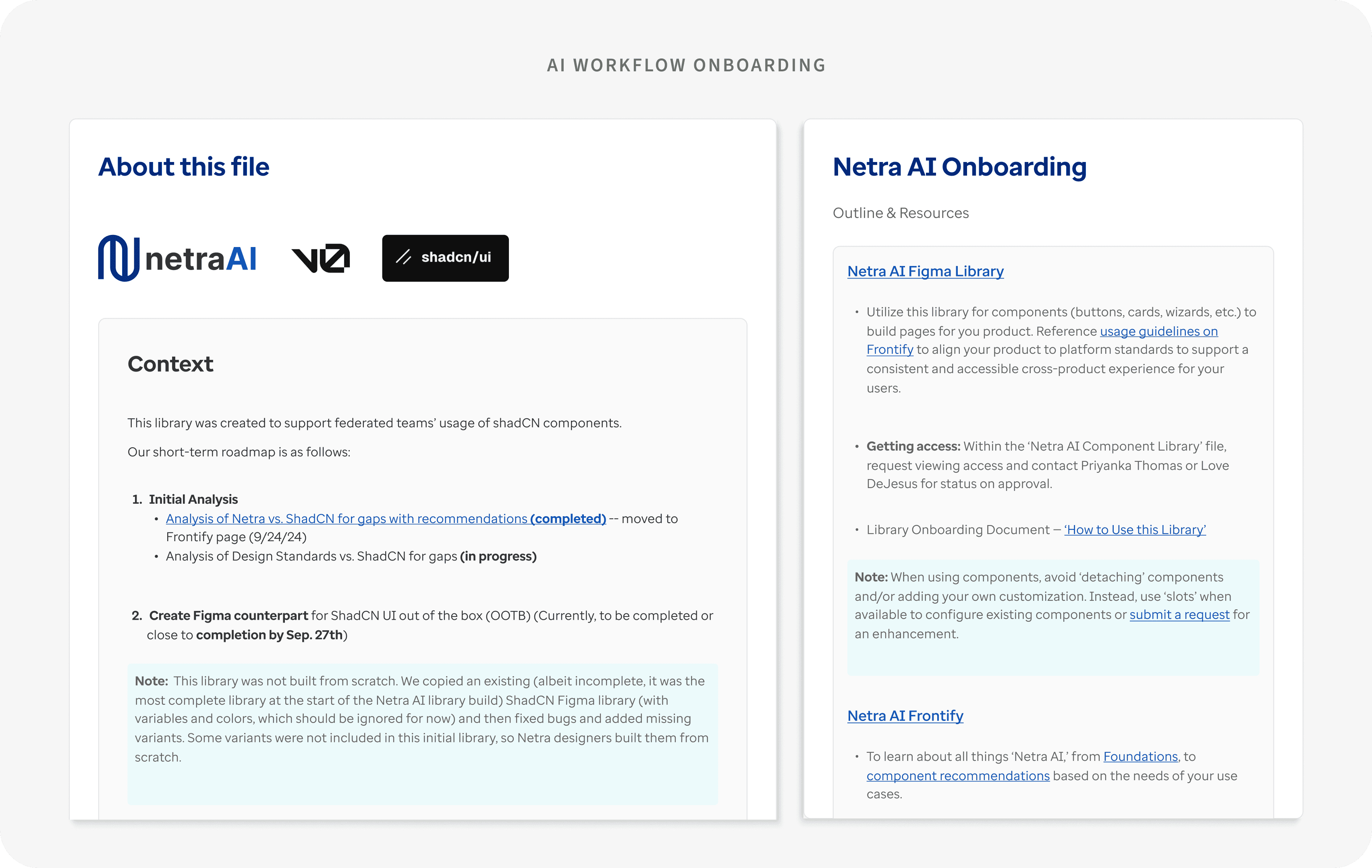
To support organizational change: Created onboarding documentation for AI workflows Developed tested prompt templates for layout and page generation Hosted daily office hours to support migration
I created onboarding documentation for AI workflows, developed tested prompt templates for layout and page generation, and hosted daily office hours— enabling teams to adopt AI workflows with clarity and confidence.
I created onboarding documentation for AI workflows, developed tested prompt templates for layout and page generation, and hosted daily office hours— enabling teams to adopt AI workflows with clarity and confidence.

THE FINAL REFLECTIONS
Takeaways
Design constraints require flexibility. Leadership mandated "no customization" of ShadCN apart from styling. I defined a split strategy: adopt base components where possible, maintain custom ones only where needed to meet clinical demands and WCAG.
Accessibility isn’t optional. Many base components failed keyboard navigation, gesture alternatives, and contrast requirements. My audit directly led to fixes in the open-source ShadCN library.
Transparency builds trust. Teams were more willing to convert when they had visibility into the roadmap and clear communication about what was (and wasn’t) ready.
“What used to take weeks now happens in minutes—and I trust the output. It finally feels like the tool is working with designers, not replacing us.”
PRODUCT DESIGNER | ALYSSA
THE FINAL REFLECTIONS
Takeaways
Design constraints require flexibility. Leadership mandated "no customization" of ShadCN apart from styling. I defined a split strategy: adopt base components where possible, maintain custom ones only where needed to meet clinical demands and WCAG.
Accessibility isn’t optional. Many base components failed keyboard navigation, gesture alternatives, and contrast requirements. My audit directly led to fixes in the open-source ShadCN library.
Transparency builds trust. Teams were more willing to convert when they had visibility into the roadmap and clear communication about what was (and wasn’t) ready.
“What used to take weeks now happens in minutes—and I trust the output. It finally feels like the tool is working with designers, not replacing us.”
PRODUCT DESIGNER | ALYSSA


